You have a working PCB, a battery, maybe a display, a few buttons and a USB-C port.
Now you need an enclosure.
It is tempting to import the PCB into CAD, draw a shell around it and start refining the outside of the product.
I usually would not start there.
Before designing the housing, I want to understand two things: what the product needs to do technically, and what the person using it actually needs.
The PCB, battery, display, controls and enclosure are not separate problems. Together, they form the physical architecture of the product.
And ultimately, the user is the final judge of whether that product experience works.
PCB enclosure design brings the board, components, housing, and user interaction together. It matters because decisions about controls, connectors, mounting, and assembly affect both the electronics and the finished product. Before refining the exterior, I check those relationships and identify what still needs to be tested.
Start Outside, Then Work In
- User
- Use context
- Product behavior
- Architecture
- Components
- Enclosure
Start with the user
Before deciding where a button can go, ask where it should go.
Those are different questions.
The PCB might leave a convenient empty area on one side of the product. Mechanically, it may look like the perfect place for a button. But if the user’s thumb cannot reach it comfortably, the available space does not matter.
The same applies to a display, charging port, speaker opening, status light or any other interface.
So before committing to the enclosure, I want to understand how the product will actually live in someone’s hands.
How is it held? What does the user look at? What do they press most often? Is it used while walking, sitting or working? Does it spend time on a desk? Is it used while charging? Which surfaces touch the hand or body?
Some of those answers can come directly from users.
If you are developing the next version of an existing product, customer feedback may already contain them. For a new product, reviews of competing products, enthusiast communities, Reddit discussions and conversations with representative users can reveal recurring frustrations and workarounds.
If you’re revising an existing device, my guide to product redesign for consumer electronics covers deciding what to change and what to preserve.
Maybe people repeatedly complain that an important action takes three steps in a competing product. That could suggest a dedicated physical control.
Maybe users love a product until they try to use it while charging.
Maybe they have created their own workaround for something nobody on the development team considered important.
You cannot always discover those things by sitting in front of CAD.
Users do not necessarily tell you what the solution should be.
They tell you where the friction is.
The job of product development is to interpret that information and turn it into better decisions.
Keep decisions reversible while you are still learning
I like applying a simple decision-making framework to physical product development:
reversible decisions and hard-to-reverse decisions.
An early change to the enclosure shape may cost almost nothing.
Moving a button during the first CAD study may take an hour.
Changing something after the first prototype may still be relatively easy.
Changing the same decision after tooling, certification, supplier commitments and a purchase order for 2,000 units is very different.
Technically, almost anything can be changed.
The real question is how expensive that change becomes once other decisions depend on it.
This is why I do not try to make everything final as early as possible.
I want important decisions to become permanent when we have enough information to be confident in them.
Early product development is where uncertainty is still relatively inexpensive.
Use that advantage.
The Cost of Changing Your Mind
Increasing cost of reversal
- Concept
- CADMove button
- PrototypeChange grip or enclosure geometry
- Validated design
- ToolingModify production geometry
- Production order2,000 units already committed
Does the PCB need to be finalized first?
Not necessarily.
Once the basic user requirements are understood, I start mapping the product architecture and asking what is actually fixed.
I usually think about constraints in three groups:
fixed, negotiable and flexible.
A display dimension may already be fixed.
A particular sensor may be required.
The battery may be selected but still have freedom in its position or orientation.
A USB-C connector may appear fixed because it exists on the current PCB, but moving it on the next board revision might create a much better product.
The enclosure shape may be highly flexible.
Or perhaps the exterior has already been tested with customers and represents an important part of the product proposition. In that case, the form itself may be one of the stronger constraints.
Every project is different.
The important question is:
Are we designing around a real constraint, or simply around a decision somebody made earlier?
That distinction can prevent a lot of redesign later.
Before Designing Around a Constraint, Ask Whether It Is Really Fixed
Fixed
- Display dimensions
- Required sensor
- Critical component
- Validated product requirement
Negotiable
- Battery orientation
- Connector position
- PCB outline
- Button mechanism
Flexible
- Exterior form
- Part split
- Surface transitions
- Some fastening choices
Build the product architecture before polishing the exterior
Once we know what is actually fixed, the internal architecture becomes much easier to develop.
For a small electronic product, that normally means understanding the real geometry and requirements of the PCB, battery, display, buttons, connectors, antenna, speakers, sensors, wiring and anything that produces meaningful heat.
But the objective is not simply to make everything fit.
The better question is:
How should these things live together as a product?
The smallest possible arrangement is not automatically the best arrangement.
A battery might fit in a certain location but create an uncomfortable warm area near the user’s hand.
A connector may fit against the enclosure wall but be poorly supported.
A speaker may require acoustic volume.
An antenna may need distance from metal.
A component might technically clear the housing while being almost impossible to install during assembly.
The architecture has to work for the electronics, the manufacturing process and the user at the same time.
A similar approach in Elara
This is also how I approached my Elara earbud concept.
I did not begin with a finished exterior and then search for somewhere to hide the functional parts.
The development moved through real ear scale, existing earbud measurements, speaker volume, electronics housing, proportions, fit and retention, interaction, and eventually the three-ring architecture of the product.
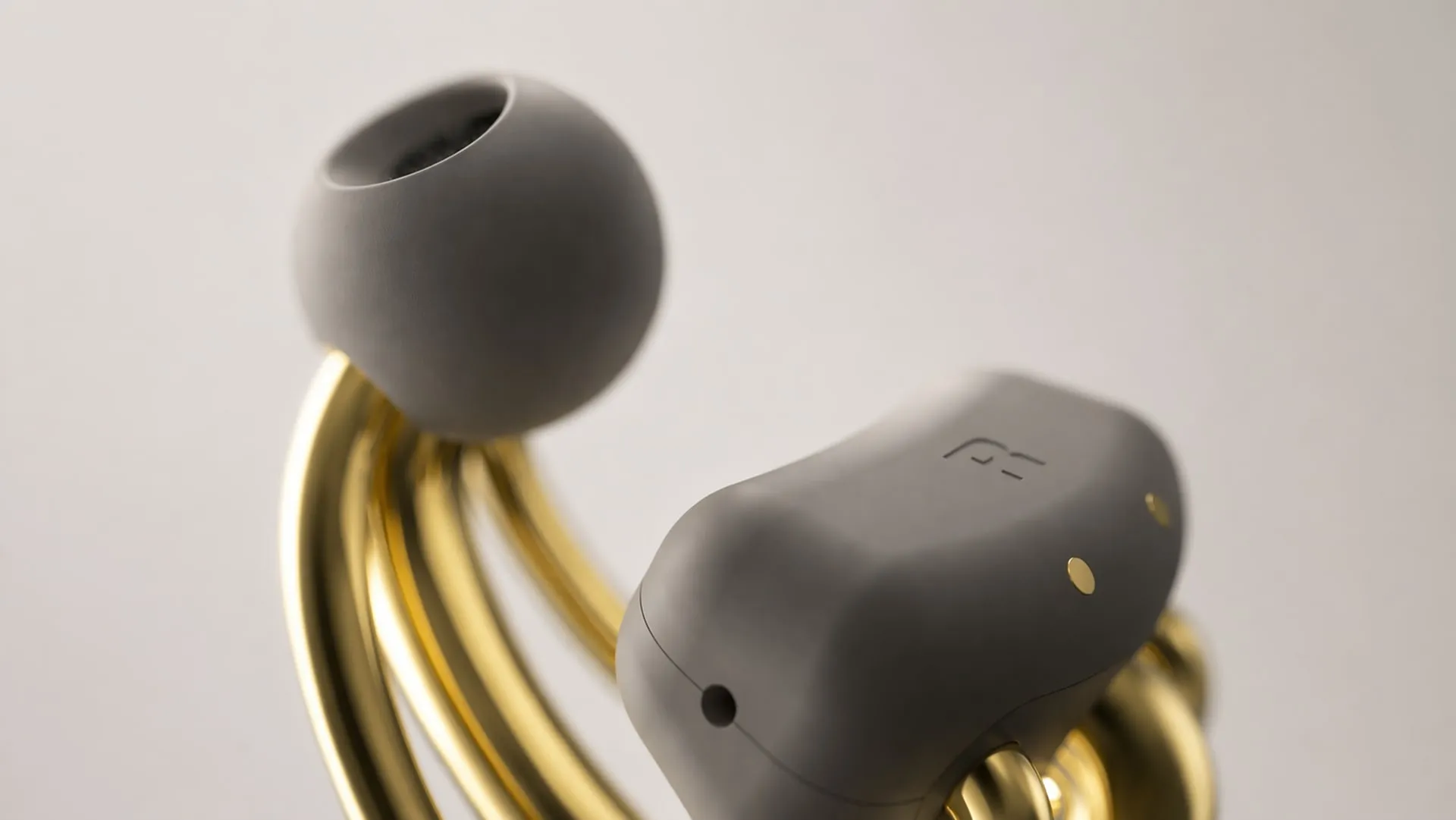
The form and the functional volumes developed together.
That distinction matters.
The enclosure should not just contain the product.
It is part of the product.
A connector is not just a hole in the housing
Consider a USB-C port.
At first it looks like a simple CAD problem. Position the connector near the enclosure wall and create an opening around it.
But when someone connects a cable, they create a physical load.
Their hand moves the cable.
The cable loads the connector.
The connector loads the PCB.
The PCB transfers that load through its mounting structure into the enclosure.
Buttons behave similarly. A finger creates a force that travels through the button, actuator, PCB or mechanism, supports and housing.
That means connector and control placement should be considered as part of the product architecture, not as openings added at the end.
There is also a user-experience question.
When you attach a cable to a wireless product, it temporarily becomes a cabled product.
Its balance can change.
Its grip can change.
The cable may interfere with a desk or the user’s hand.
The product may sit differently.
It may even feel like a different object during charging.
So the best connector location is not always the one that is easiest for the PCB.
Again, the user is the final judge of whether that experience works.
Why prototype if everything fits in CAD?
Modern CAD eliminates an enormous amount of uncertainty.
We can check dimensions, study clearances, find obvious collisions, explore assembly relationships and package complicated components before spending money on a physical sample.
That dramatically shortens development.
But there is a line CAD cannot cross.
A product can be perfect on the screen and still be wrong in your hand.
A battery may fit perfectly in CAD and still be awkward to install.
A button may line up perfectly but feel terrible.
A seam may look precise at high zoom and still feel cheap when your finger crosses it.
A cable may have enough geometric clearance but pull the product in an uncomfortable direction.
Two parts may technically fit but rattle in use.
A handheld product may look beautifully proportioned on a monitor and feel unexpectedly large once you hold it at real scale.
CAD and physical prototypes answer different questions.
CAD should remove as much uncertainty as possible before we spend time and money building something.
Then the physical prototype should answer the questions the screen cannot.
CAD vs Physical Prototype
CAD can tell you:
- Geometry
- Clearances
- Component collisions
- Basic assembly relationships
- Dimensions
- Packaging efficiency
Physical testing can help assess:
- Hand feel
- Real scale
- Balance
- Button feel
- Cable behavior
- Assembly difficulty
- Rattle / movement
- How users actually behave
Every prototype should have a job
A prototype does not need to be a miniature version of the final manufacturing process.
It needs a reason to exist.
The first prototype may mainly test the internal architecture.
Can the real components fit?
Can everything be installed in the intended order?
Can you reach the connector?
Can the battery be secured?
Are wires being trapped?
Can the enclosure actually close?
The next iteration may focus much more on the user.
How does it feel in the hand?
Can people find the controls naturally?
Is the button force appropriate?
Does the product sit correctly when a cable is attached?
Is the display readable from the real viewing angle?
A later sample may focus on assembly, materials, manufacturing details or cosmetic quality.
There is no universal number of prototypes that every product needs.
Multiple sampling rounds are simply a normal part of many custom product-development programs. Early samples also do not always need every final cosmetic process if geometry, fit or function may still change.
There is little value in perfecting a finish on a part that may be redesigned next week.
Instead of asking whether an early prototype looks finished, ask:
What uncertainty did this prototype remove?
Put it in front of users
The development team can make intelligent predictions about ergonomics.
We can study reach.
We can compare competing products.
We can use dimensions, anthropometric information and previous product experience.
But eventually someone has to use the thing.
That is where assumptions become evidence.
A control that appeared obvious may not be obvious at all.
Something comfortable for five minutes may become annoying after an hour.
A charging port may interfere with how people naturally use the product.
A status light may be almost invisible from the normal viewing position.
Sometimes a product can even work exactly as designed while solving the wrong problem.
This is why user feedback should not happen only once at the beginning or once at the end.
The useful loop is:
understand → design → prototype → observe → learn → revise
Then repeat it while the important decisions are still relatively easy to change.
Users do not design the product for us.
But they tell us whether our decisions survived reality.
Some engineering decisions are actually business decisions
A technical component can quietly determine what market your product can serve.
Bluetooth is a good example.
The choice is not necessarily just between one chip and another. The wireless module, firmware stack, supported Bluetooth profiles, codecs, accessory protocols and certification requirements can determine which phones, computers or other devices the product works with reliably.
Imagine that one technical solution works well across the platforms your target customers already use, while another limits the product to a narrower ecosystem.
That is no longer simply:
Which component is technically better?
The more important questions are:
Who are we building this product for?
Which devices do those customers already use?
Which compatibility promises do we want to make?
Are we deliberately serving one ecosystem, or do we need broader compatibility?
The engineering choice is now defining the addressable product.
That makes it a business decision expressed through electronics.
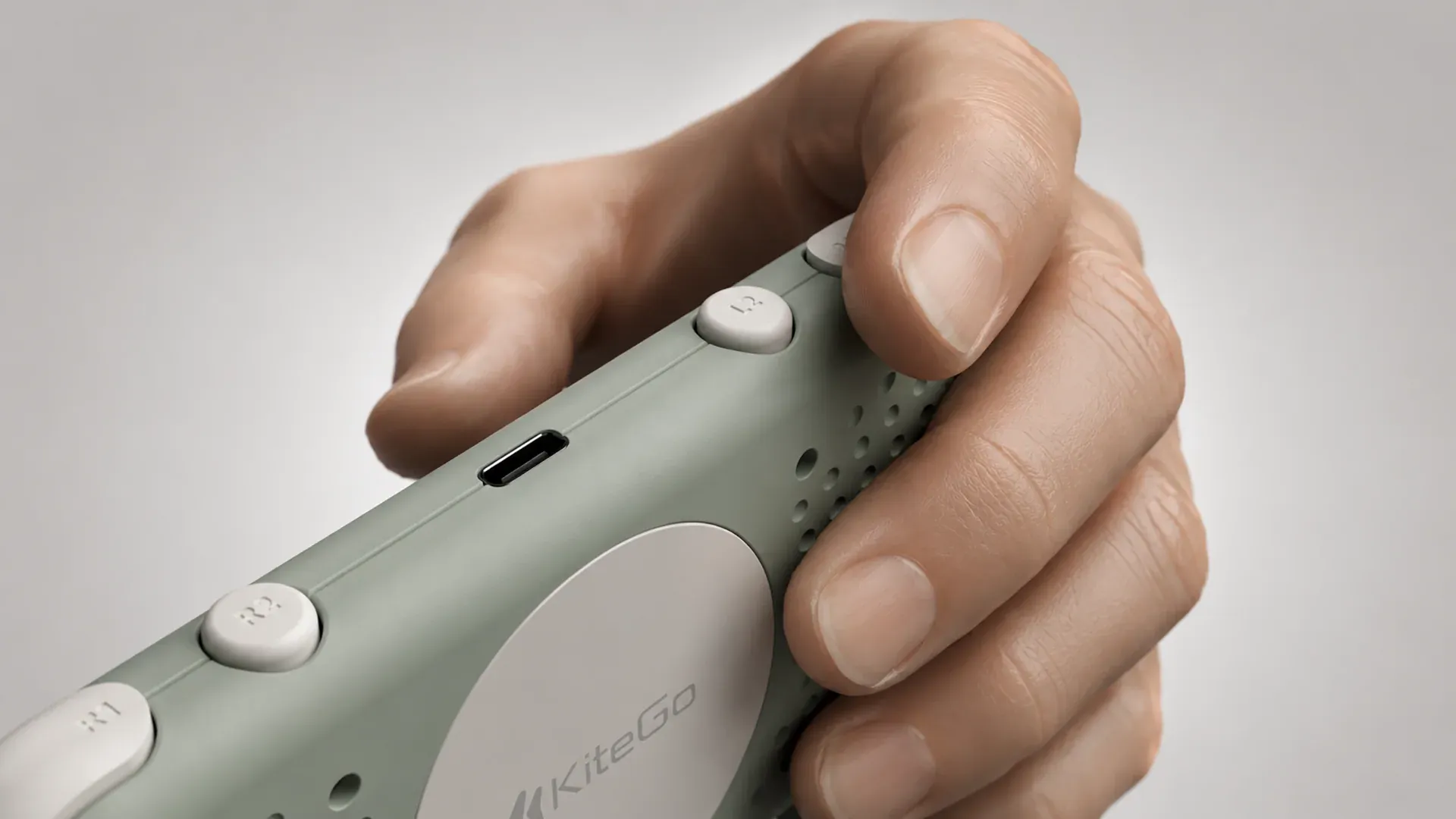
That distinction came up during the client controller project behind the KiteGo portfolio adaptation.
The manufacturer presented Bluetooth chip options with different compatibility across Windows and particular Xbox and PlayStation models. I considered the supported devices against the client’s intended customers and business priorities, then selected the appropriate options. This was a product and business decision expressed through a component choice.
Separately, the manufacturer raised an issue between the Bluetooth antenna and the aluminum housing, whose wall thickness was approximately 2 mm. I discussed it with the client, researched the issue, identified a plastic RF window as the solution, and selected its location near the antenna.
I worked with the manufacturer to integrate the RF window into the enclosure, and the client approved the solution. It addressed the antenna issue while retaining the aluminum design and a discreet appearance.
These were two distinct decisions: one about which devices the product should support, and another about integrating the antenna with the aluminum enclosure. Both connected electronics, materials, appearance and the client’s business priorities.
A larger battery creates another version of the same tradeoff. More runtime can also mean more size, weight and cost.
Water resistance may improve the product proposition while increasing assembly complexity.
A premium material can improve perceived quality while making RF performance, tooling or production more difficult.
A technically superior component may add cost for a feature the target customer barely values.
Product development is full of decisions like these.
The objective is not to maximize every technical specification.
It is to build the right product for the people and business it needs to serve.
For consumer electronics, the manufacturer may be the front door to a larger Shenzhen ecosystem
Another common mistake is imagining manufacturing as a simple handoff:
Finish the CAD.
Send it to a factory.
Receive finished products.
That is not how many consumer-electronics projects actually develop.
In projects I have worked on with manufacturers in Shenzhen and the wider Chinese manufacturing ecosystem, the company you speak with may become the main point of contact while other specialist suppliers participate behind it.
If the product needs a PCB or PCBA supplier, they may already have one they regularly work with.
The same can happen with batteries, injection molding, tooling, cables, finishing, packaging and other components.
So the “factory” can effectively become the front door to a much larger development network.
This is one of Shenzhen’s major advantages for electronics. PCB suppliers, component vendors, battery suppliers, mold makers, plastics manufacturers, assembly partners and many other specialists exist inside a mature and tightly connected manufacturing ecosystem.
That can shorten the distance between identifying a problem and finding someone capable of solving it.
It also means you do not always need to personally build and manage an independent relationship with every supplier involved in the product.
But the most valuable part is not simply sourcing.
It is feedback.
A good manufacturing partner may identify an assembly problem.
They may suggest a different fastening strategy.
They may know a component that is easier to source.
They may point out unnecessary tooling complexity.
They may explain that a beautiful detail will create an expensive production problem.
I want those conversations.
Manufacturing feedback is not something that happens after design.
It is another source of information that improves the product.
When is an enclosure actually ready for manufacturing?
When a prototype works, you have proved something important.
But you have not proved that 2,000 or 20,000 units will behave the same way.
Production introduces another layer of reality.
Materials vary.
Processes vary.
Assemblies need tolerances.
Workers need repeatable procedures.
Suppliers need specifications.
Inspection needs criteria.
Tooling needs to reproduce the same geometry reliably.
A carefully assembled prototype may tolerate something that a production line cannot.
That is why the move from prototype to manufacturing should be treated as another development stage rather than a final handoff.
The manufacturer may recommend geometry changes.
The fastening strategy may change.
A boss may need revision.
Wall thickness may need adjustment.
Parts may need another split.
Tolerances may need to open or tighten.
Cosmetic processes may expose new limitations.
None of that necessarily means the original design failed.
It means the product has moved into a different problem.
A prototype provides evidence about the questions it was built and tested to answer.
Production development then needs to establish whether the product can be made repeatedly, at the required quality and a viable cost.
If you’re moving from a printed prototype toward injection molding, my guide to what to resolve before tooling explores that next stage in more detail.
PCB Enclosure Development Checklist
Before committing to an electronics enclosure, I would want clear answers around:
PCB Enclosure Development Checklist
User
Architecture
Interaction
Validation
Manufacturing
Commitment
The exact answers will be different for every product.
The important part is making those questions explicit before expensive commitments begin.
The enclosure is where the product becomes real
If you already have a working PCB, you are well into the development process.
But the enclosure is not simply the final wrapper around the electronics.
It is where electronics, industrial design, ergonomics, manufacturing, business requirements and user experience finally have to coexist.
The goal is not to make every decision permanent as quickly as possible.
It is to make the right decisions permanent at the right time.
Use CAD aggressively while questions can be answered on screen.
Prototype the things you need to feel, assemble and test.
Put the product in people’s hands.
Listen to what users struggle with, even when they cannot tell you the solution.
Bring manufacturers and specialists into the loop when their knowledge becomes relevant.
Keep decisions flexible while you are still learning.
Then, as confidence increases, move deliberately toward tooling, purchasing and production.
Because changing a button in CAD is cheap.
Changing it after 2,000 products arrive is not.